Authentik MongoDB Atlas SSO
This module configures Authentik for integration with MongoDB Atlas.
Guide
Deploy MongoDB Atlas Provider & Application in Authentik
Add a new a
authentik_mongodb_atlas_ssofolder adjacent to yourauthentik_core_resourcesfolder.Add a new a
terragrunt.hclfile that looks like this:9 collapsed linesinclude "panfactum" {path = find_in_parent_folders("panfactum.hcl")expose = true}terraform {source = include.panfactum.locals.pf_stack_source}dependency "authentik_core" {config_path = "../authentik_core_resources"}dependency "kube_authentik" {config_path = "../kube_authentik"}inputs = {organization_name = dependency.authentik_core.outputs.organization_nameauthentik_domain = dependency.kube_authentik.outputs.domain# Replace AFTER "Setup MongoDB Atlas Identity Provider"# with the `ACS URL`# Example: https://auth.mongodb.com/sso/saml2/0oaw7vqdsehzxtqZ1297acs_url = "REPLACE_ME"# Replace AFTER "Setup MongoDB Atlas Identity Provider"# with the `Audience URI`# Example: https://www.okta.com/saml2/service-provider/spzsbkposqvrzhbjcdnzaudience = "REPLACE_ME"}Run
pf-tf-initRun
terragrunt apply
Setup MongoDB Atlas Identity Provider
Please follow the steps defined in the MongoDB Atlas Identity Provider and resume here.
Sync Authentik with the Atlas Settings
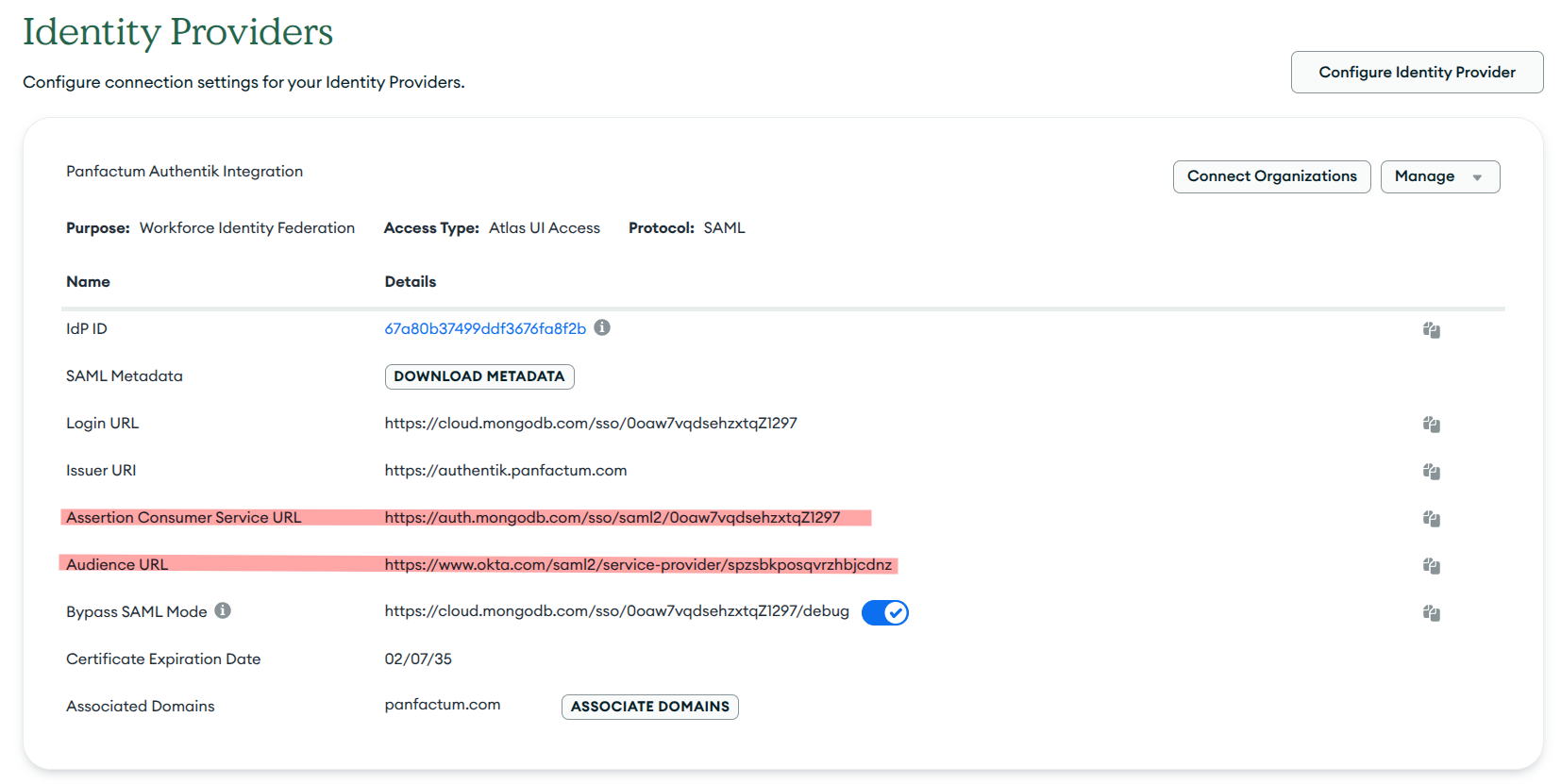
Copy and set the
ACS URLfrom the MongoDB Atlas Identity Provider setup to theacs_urlinput.Copy and set the
Audience URIfrom the MongoDB Atlas Identity Provider setup to theaudienceinput.Run
terragrunt apply
Test the Integration
Go to your Authentik instance
Find the mongodb atlas application
Click and confirm that you are able to login
Providers
The following providers are needed by this module:
authentik (2024.8.4)
kubectl (2.1.3)
kubernetes (2.34.0)
random (3.6.3)
tls (4.0.6)
Required Inputs
The following input variables are required:
acs_url
Description: The ACS url provided by Mongo Atlas when configuring an external identity provider
Type: string
audience
Description: The Entity URL provided by the Service Provider
Type: string
authentik_domain
Description: The domain name of the authentik instance
Type: string
organization_name
Description: The name of your organization
Type: string
Optional Inputs
The following input variables are optional (have default values):
allowed_groups
Description: Only members of these groups can access MongoDB
Type: set(string)
Default: []
authentik_namespace
Description: The kubernetes namespace where Authentik is deployed
Type: string
Default: "authentik"
media_configmap
Description: The configmap holding the static media that Authentik will use
Type: string
Default: "media"
ui_description
Description: The description to display in the Authentik web dashboard
Type: string
Default: "MongoDB Atlas"
Outputs
The following outputs are exported:
issuer_url
Description: The Authentik issuer URL for the MongoDB Atlas provider
saml_metadata
Description: The SAML metadata for the MongoDB Atlas provider
url_sso_post
Description: The SSO POST URL for the MongoDB Atlas provider
Maintainer Notes
No notes